5.2 Argo CD
Task 5.2.1: Argo CD
Go out into the new world of GitOps and explore Argo CD.
Find out how to access Argo CD’s web interface (which is very handy).
Hints
As usual, there are multiple ways to find out what Argo CD’s dashboard URL is:
- OpenShift exposes the link via its web console:
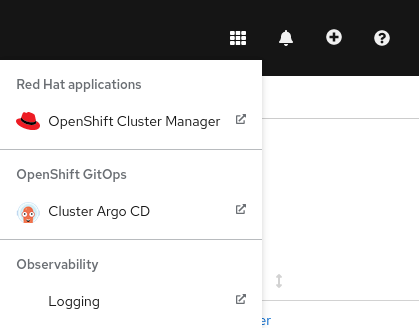
- Or get it via route from the
openshift-gitopsnamespace:
oc -n openshift-gitops get routes
Task 5.2.2: Gitea repository
Create a new Git repository on your Gitea instance.
Warning
If you want to add Secrets with sensitive data, make sure the repository is not public!Hints
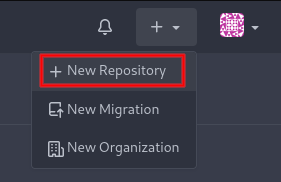
- On the upper right corner, click on the + icon and then choose New Repository:
- On the New Repository page, choose a name such as “argocd-gitops-test”
- Choose the repo’s visibility
- On the bottom of the page, click on the Create Repository button
Task 5.2.3: Argo CD application
Figure out how to create an application based on the Git repository you just created.
Hints
First, make sure you are in the Applications view, then click on + NEW APP:
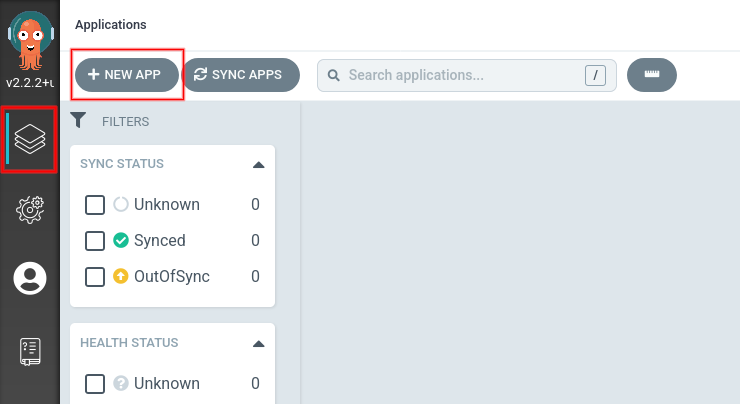
Now fill in the appropriate information:
- GENERAL
- Application Name: anything of your choosing
- Project:
default - Leave the rest as-is
- SOURCE
- Repository URL: The URL to your Git repository
- Path: Indicate in what folder the resource files reside; leave empty if they are in the root folder
- Leave the rest as-is
- DESTINATION
- Cluster URL:
https://kubernetes.default.svc - Namespace: Leave empty
- Cluster URL:
Task 5.2.4: Resource management
- Choose some of the resources you created in the course of this training, e.g.:
- The
KubeletConfigresources from task 1.3.1 - The
MachineSetresource from task 2.1.1 - The
IngressControllerdefinition - The custom Prometheus rule from task 3.3.2
- The
- Add these resource definitions to your Git repository
Note
If you are unfamiliar with Git, check out Git’s tutorial introduction to Git or ask your trainer.Hints
- Create a new directory for your repository files:
mkdir cluster-configs
cd cluster-configs
- Initialize it for usage with Git:
git init
git remote add origin <your git repository's URL>
git push -u origin main
- Taking the KubeletConfig from task 1.3.1 as an example, save its definition as a new file inside the Git directory and push it to your Gitea repository:
wget https://raw.githubusercontent.com/acend/openshift-operations-training/main/content/en/docs/01/resources/kubeletconfig_master.yaml
git add kubeletconfig_master.yaml
git commit -m "Add master's kubelet configuration"
git push
- When visiting your Gitea web interface, you should now see the added file(s)
- Apply your chosen resources using Argo CD