1.2 Cluster inspection
Before diving headfirst into configuring the freshly set-up cluster, let’s first take a look at certain features. As we installed the OpenShift cluster on AWS, some components have already been configured for us to use right away, amongst them:
- An AWS cloud provider, making it possible for controllers to, e.g., create and update AWS load balancers and do node lifecycle management
- A storage class to provision AWS Elastic Block Store (EBS) volumes
Cloud provider
In order to understand what a cloud provider is or does, it’s easiest to look at the description of the AWS cloud provider :
The AWS cloud provider provides the interface between a Kubernetes cluster and AWS service APIs. This project allows a Kubernetes cluster to provision, monitor and remove AWS resources necessary for operation of the cluster.
The cloud provider consists of different components which then make use of the mentioned interface (picture source: kubernetes.io ):
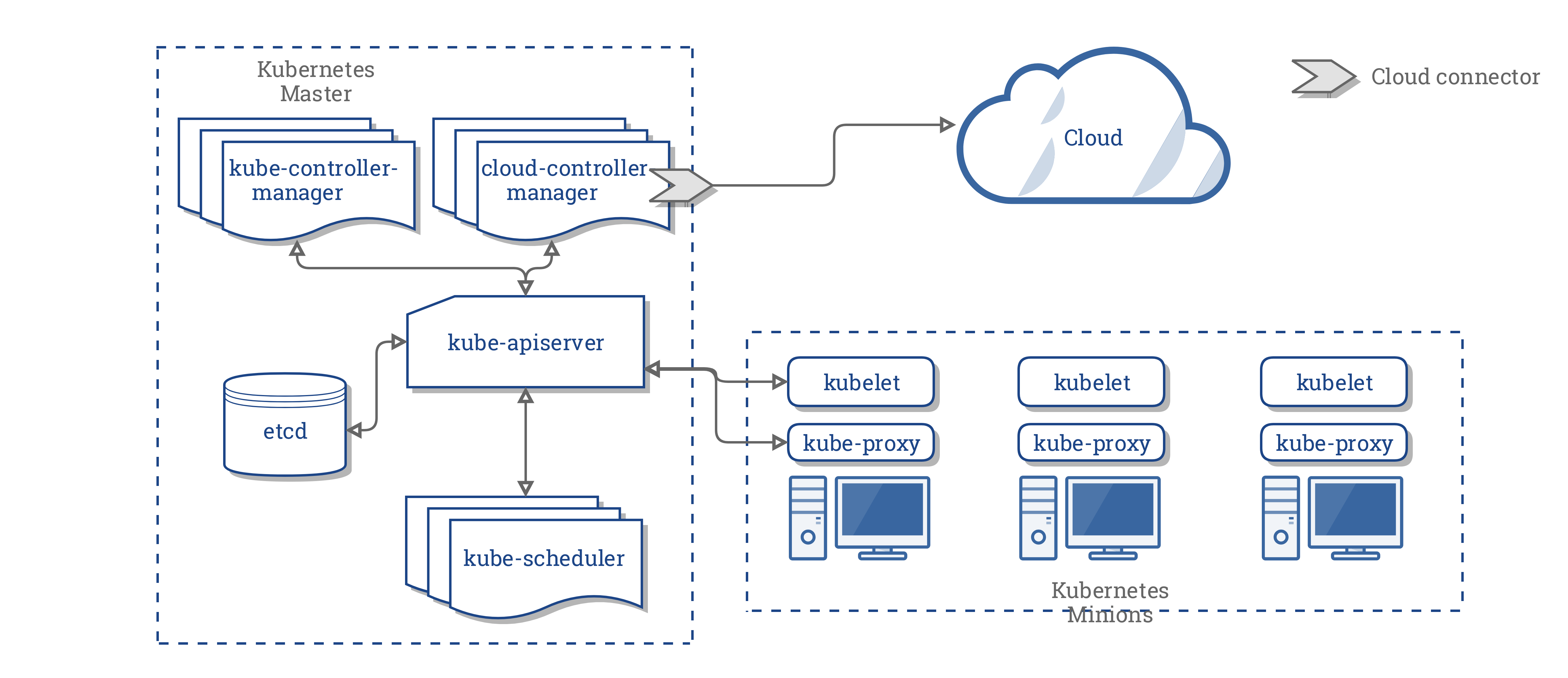
OpenShift supports a wide range of platforms in which it can integrate this way. However, depending on the installation method and platform used, the level of integration can vary greatly. AWS was the first platform to be supported by OpenShift 4 and hence offers one of the most complete integrations.
Refer to the following resources if you’re interested in more details:
- Cloud Controller Manager
- Cloud Controller Manager Administration
- cloud-provider on github.com
- cloud-provider-aws on github.com
- The Future of Cloud Providers in Kubernetes (blogpost from April 17,2019)
Storage
Storage in Kubernetes represents a significant part of the ability to save application state within the cluster.
In the early days of OpenShift 3, administrators had to manually create PersistentVolume resources. These pointed to an actual volume from a storage provider (such as an NFS server) and could then be claimed by users via PersistentVolumeClaims. If the claim could be fulfilled by one of the existing PersistentVolumes, it was bound to it and could then be used inside the container.
Kubernetes and OpenShift matured and not long after were able to provide the means to automatically or, as it is also called, dynamically create PersistentVolume resources. This includes provisioning a volume (or similar) on the storage provider itself and is usually triggered by the creation of PersistentVolumeClaims.
In order to visualize the whole workflow, consider the following diagram:
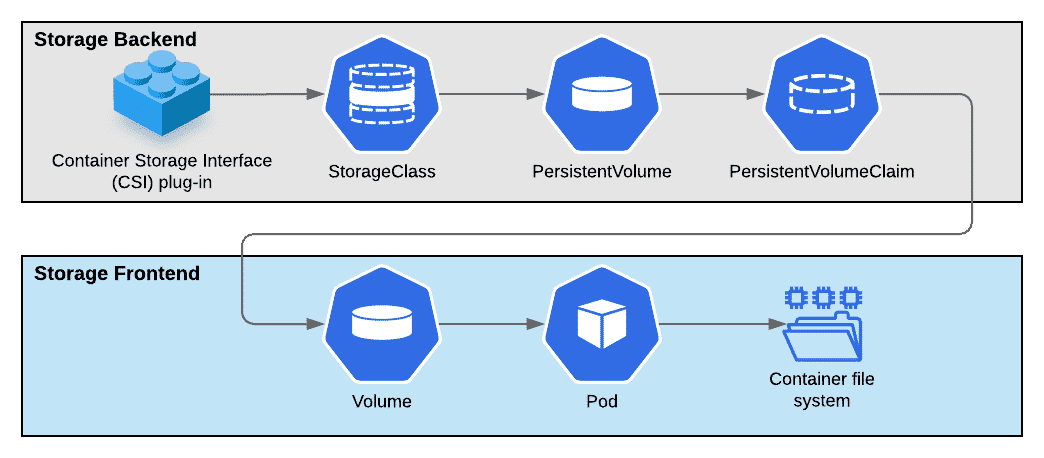
We already know most parts of this diagram:
- A PersistentVolume is bound to a PersistentVolumeClaim
- A successfully bound PersistentVolumeClaim allows the usage of a volume in a Pod
- The Pod declaration defines which volume is used inside what container and at what path
What’s new is the StorageClass and CSI plug-in. A StorageClass represents the “classes” or “profiles” of storage a cluster offers. It especially contains the information that is used when a PersistentVolume belonging to a class needs to be dynamically provisioned. Kubernetes then makes the appropriate calls via its Container-Storage Interface (CSI) to a storage provisioner. The storage provisioner in turn creates the requested volume.
Task 1.2.1: Storage class inspection
Have a closer look at the gp3-csi storage class.
Hints
oc get storageclass gp3-csi -o yaml
allowVolumeExpansion: true
apiVersion: storage.k8s.io/v1
kind: StorageClass
metadata:
  annotations:
    storageclass.kubernetes.io/is-default-class: "true"
  creationTimestamp: "2024-02-17T14:49:54Z"
  name: gp3-csi
  resourceVersion: "5427"
  uid: 1b4aa25d-3599-4b0a-9627-44a8ac7555a1
parameters:
  encrypted: "true"
  type: gp3
provisioner: ebs.csi.aws.com
reclaimPolicy: Delete
volumeBindingMode: WaitForFirstConsumer
As you can see, the provisioner field is set to ebs.csi.aws.com.
This means the AWS EBS provisioner will automatically create and delete EBS volumes when a user creates a PersistentVolumeClaim referencing the gp3-csi storage class.
Each provisioner offers different functionality, exposed as parameters inside the storage class.
The EBS provisioner allows for the encryption of the data inside the volumes, controlled via the parameters.encrypted field, which is already set.
Also set is the field parameters.type. By exposing this field the provisioner makes it possible for us to create additional storage classes, which would for example allow the use of slower, cheaper disks for workload that does not need high performance storage (e.g. backup).
The provisioner supports even more parameters
.
The remaining standard fields tell the provisioner to delete volumes when a PersistentVolumeClaim is deleted on OpenShift (because the reclaimPolicy is set to Delete) and to wait with binding the PersistentVolumeClaim to an actual PersistentVolume until a Pod starts using it (via the volumeBindingMode field).
Network and architecture
If you are interested in the underlying network and architecture of an AWS OpenShift cluster, have a look at AWS Architecture Blog’s article “Architecture Patterns for Red Hat OpenShift on AWS” .